Turn Your Ordinary Photos into Professional Photos with AI
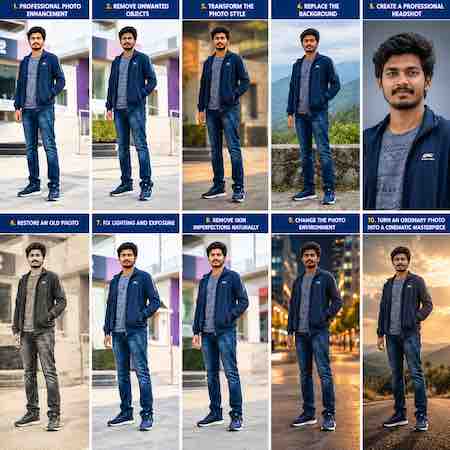
Turn Your Ordinary Photos into Professional Photos with AI — No Extra Tools Needed!
No experience. No coding. No design skills. No external tools. No photo editors. Just your photo, your prompt, and AI!
Have you ever wanted to transform an ordinary selfie into a professional-looking portrait but felt that photo editing was too complicated?
Good news, With AI-powered image editing in ChatGPT Canvas, you can explore creative ways to enhance your photos using simple, everyday language and ready-to-use prompts.
Forget complicated editing workflows. You don’t need to learn professional design software, master Photoshop, or write a single line of code to get started.
What Can You Do with These AI Photo Commands?
Simply upload your photo, choose a command, and tell AI what you want to improve.
1. Professional Photo Enhancement
Improve lighting, exposure, sharpness, colors, and contrast while preserving natural skin textures and your original appearance.
2. Remove Unwanted Objects
Clean up distracting objects and unwanted background elements to create a cleaner, more professional-looking image.
3. Professional Portrait Transformation
Give your photo a polished, business-ready appearance suitable for professional profiles, portfolios, and personal branding.
4. Background Enhancement
Create a cleaner, more attractive background that complements your photo and keeps the focus on you.
5. Lighting and Color Correction
Improve dull lighting, balance colors, and make your photo look more vibrant and visually appealing.
6. Social Media Profile Photos
Prepare polished profile pictures for Instagram, Facebook, LinkedIn, and other platforms.
7. Creative Photo Styling
Explore different visual styles while keeping your image recognizable and natural.
8. Old Photo Restoration
Try improving faded photographs, reducing visible imperfections, and recovering detail where possible.
9. Skin and Detail Retouching
Request subtle retouching while maintaining realistic skin texture instead of an artificial, overly smooth appearance.
10. Ready-to-Share Image Creation
Prepare polished images for personal branding, content creation, social media posts, and professional presentations.
How It Works
You don’t need to be a photographer, designer, programmer, or editing expert.
Step 1: Open ChatGPT and access the available image-creation or editing experience.
Step 2: Upload the photo you want to improve.
Step 3: Copy one of the photo-enhancement commands below.
Step 4: Ask AI to make the requested changes.
Step 5: Review the result and request adjustments until you are happy with it.
Try This Copy-and-Paste Command
/professional-photo-enhance
Prompt:
“Enhance my uploaded photo to professional quality. Improve lighting, exposure, sharpness, colors, and contrast. Preserve my original identity, facial features, natural skin texture, and realistic appearance. Avoid excessive retouching, artificial effects, or unnecessary changes. Create a clean, polished, high-quality result suitable for professional use.”
What You Don’t Need
- No coding knowledge
- No graphic design experience
- No professional photography skills
- No separate photo editor required for a supported workflow
- No complicated manual editing process
- Just your photo, a clear prompt, and an available AI image-editing feature
Important: These slash commands are convenient prompt shortcuts, not necessarily built-in ChatGPT commands. Canvas and image-editing capabilities can vary by interface and account. Use the image tools available in your ChatGPT experience; some edits may require the image-generation feature rather than Canvas itself.
Why This Matters
AI is making creative work more accessible. Tasks that once required specialized editing knowledge can now be attempted through simple instructions.
Whether you are a student, job seeker, business owner, content creator, or professional, you can experiment with better-looking photos without first learning a complicated editing workflow.
Your creativity matters more than your technical experience.
Final Words
Your photo. Your prompt. Your creativity. Powered by AI.
Start experimenting with AI photo enhancement today and discover new ways to present yourself professionally.
Follow AI.HACKSA — Discover AI Usage and Prompts for Professional Work for more practical AI commands, tutorials, and creative workflows.
Comment “PHOTO AI” if you want more copy-and-paste prompts for professional portraits, selfies, product photography, and social media content.
Save this post for your next photo makeover!
#AIHacksa #ChatGPT #Canvas #AIPhotoEditing #PhotoEnhancement #AITools #ProfessionalPhotography #AIForEveryone #PromptEngineering #ContentCreation
85 total views

Leave a Reply
You must be logged in to post a comment.