ChatGPT – Slash Commands for Professional Food Menu Photography
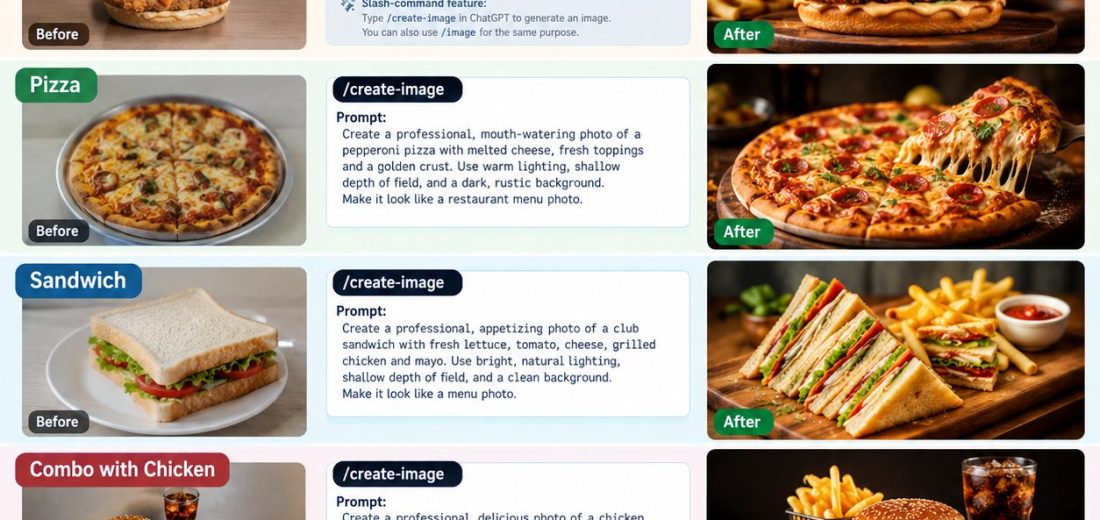
ChatGPT – Slash Commands for Professional Food Menu Photography
Use these ready-to-copy prompts to transform ordinary food photos into professional, appetizing restaurant menu images for burgers, pizzas, sandwiches, and chicken combos.
The idea is simple: upload your original food photo, use a slash-command-style instruction, and describe the professional look you want. ChatGPT can help generate a new image or edit the uploaded image, depending on your request.
1. Before and after: Food photography examples
The generated visual guide includes four food categories, prompt examples, and command options.
2. Copy-and-use food photography commands
These are custom slash-command shortcuts, not official built-in ChatGPT commands. You can type them directly into your message after uploading a photo.
01. Burger — /burgerpro
Best for restaurant menus, delivery apps and promotional posters.
Prompt Transform the uploaded burger photo into premium commercial food photography. Preserve the actual burger ingredients and shape. Highlight the sesame bun, juicy patty, melted cheese, fresh lettuce and sauce. Use warm studio lighting, realistic textures, shallow depth of field and a dark wooden background. Photorealistic, crisp focus, appetizing presentation, 4K-style detail, landscape 4:3 composition. No text or watermark. Copy burger command
02. Pizza — /pizzapro
Best for pizza menus, special offers and food delivery listings.
Prompt : Create a premium menu photograph from the uploaded pizza image. Highlight the golden crust, melted mozzarella, fresh toppings and natural cheese texture. Use appetizing warm light, realistic steam only if appropriate, a rustic wooden serving board and a softly blurred restaurant background. Keep the pizza shape and toppings authentic. Commercial food photography, detailed texture, landscape 4:3, no text or watermark. Copy pizza command
03. Sandwich — /sandwichpro
Best for grilled sandwiches, club sandwiches and café menus.
Prompt : Enhance the uploaded sandwich photo into professional café menu photography. Show the toasted bread, visible layers of chicken, cheese, lettuce and tomato, with fresh ingredients and appetizing texture. Arrange neatly on a wooden serving board with optional fries and dip. Use soft natural side lighting, clean composition, realistic colors and sharp food details. Preserve the actual recipe. Landscape 4:3, no text or watermark. Copy sandwich command
04. Chicken combo — /chickencombo
Best for combo meals, value meals and promotional campaigns.
Prompt
Turn the uploaded chicken combo photo into a premium restaurant menu image. Feature the actual chicken burger, crispy fried chicken, golden fries, dip and beverage included in the meal. Arrange all items clearly with balanced spacing on a dark wooden table. Use warm cinematic lighting, realistic crispy textures, vibrant but natural colors and professional commercial styling. Keep every item visible and authentic. Landscape 4:3, no text or watermark. Copy chicken combo comman
3. Extra slash-command options
Use these shortcuts with any of the four food categories.
4. Useful command library
These are additional custom shortcuts you can define in your prompts.
| Custom command | What it does |
|---|---|
/foodbeforeafter | Requests a before-and-after comparison |
/editfood | Improves an uploaded food photo |
/foodvariations | Requests several styling alternatives |
/foodupscale | Requests improved detail and resolution |
/foodstyle | Changes the background and lighting |
/menucombo | Arranges multiple menu items together |
/foodposter | Creates a promotional food poster |
/fooddelivery | Creates a clean delivery-app listing image |
To use one, type the shortcut and its instructions together. These names are examples, not automatically registered commands in ChatGPT. The image tools can create or edit visuals when available in your chat.
5. Recommended workflow
Step 1 — Upload the original food photo
Start with your actual burger, pizza, sandwich or combo photo.
Step 2 — Enter a command
Example: /burgerpro followed by the matching prompt.
Step 3 — Refine the result
Ask for brighter lighting, a different background, a closer crop or a square layout.
Step 4 — Prepare it for the menu
Check that ingredients, portion sizes and toppings are accurate before publishing.
46 total views


Leave a Reply
You must be logged in to post a comment.