99 Hidden ChatGPT Commands
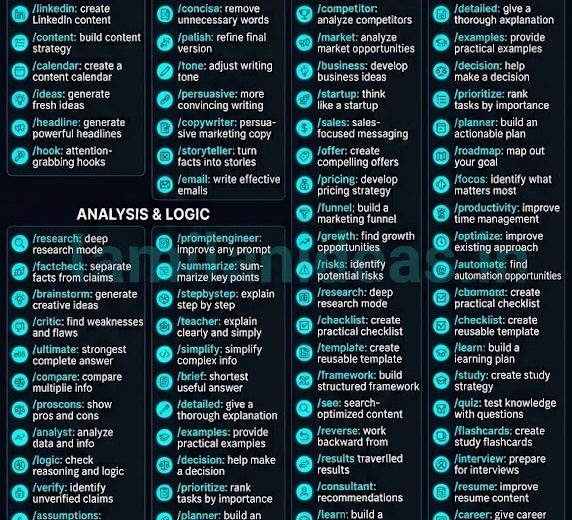
99 Hidden ChatGPT Commands You Should Know
Most people use ChatGPT by simply typing a question and waiting for an answer. But you can get much better results by giving ChatGPT clear instructions about how you want it to respond.
There are many command-style prompts and instruction patterns that can help you control the tone, depth, structure, creativity, and purpose of a ChatGPT response.
In this guide, we explore 99 useful ChatGPT commands and prompt shortcuts that you can try in your daily work, business, studies, coding, content creation, and personal productivity.
These are not necessarily official built-in ChatGPT commands. They are simple instruction shortcuts that you can type into your conversations to tell ChatGPT how you want it to work.
What Are ChatGPT Commands?
A ChatGPT command is a short instruction that tells the AI how you want it to respond or perform a task.
For example:
/human Rewrite this email professionally.
Or:
/summarize Summarize this document in 5 bullet points.
The command provides additional instructions about the type of response you want.
You can also combine multiple commands to create more specific instructions.
99 ChatGPT Commands
General ChatGPT Commands
1. /human
Make the response sound more natural and human.
Example:
/human Rewrite this message naturally.
2. /expert
Ask ChatGPT to respond from an expert perspective.
Example:
/expert Explain database optimization for a production application.
3. /simple
Make the explanation easier to understand.
Example:
/simple Explain cloud computing.
4. /detailed
Request a more detailed explanation.
Example:
/detailed Explain how an e-commerce payment system works.
5. /short
Ask for a concise answer.
Example:
/short Explain the benefits of SEO.
6. /deep
Ask for deeper analysis.
Example:
/deep Analyze the advantages and disadvantages of AI automation.
7. /stepbystep
Request a step-by-step explanation.
Example:
/stepbystep Show me how to launch a website.
8. /explain
Ask ChatGPT to explain something.
Example:
/explain What is an API?
9. /eli5
Ask for a very simple explanation.
Example:
/eli5 Explain artificial intelligence.
10. /example
Ask for practical examples.
Example:
/example Explain database indexing with real-world examples.
Writing Commands
11. /rewrite
Rewrite existing content.
Example:
/rewrite Improve this paragraph.
12. /professional
Make the content professional.
Example:
/professional Rewrite this email.
13. /friendly
Make the message friendly and approachable.
Example:
/friendly Rewrite this message.
14. /formal
Use a formal writing style.
Example:
/formal Rewrite this business communication.
15. /casual
Make the writing more conversational.
Example:
/casual Rewrite this message.
16. /polite
Make the wording more polite.
Example:
/polite Rewrite this request.
17. /firm
Make the message clear and firm without being rude.
Example:
/firm Rewrite this escalation email.
18. /grammar
Correct grammar and language.
Example:
/grammar Correct this paragraph.
19. /proofread
Proofread the content.
Example:
/proofread Check this article for grammar and spelling mistakes.
20. /simplify
Simplify complicated writing.
Example:
/simplify Rewrite this technical explanation.
Learning Commands
21. /teach
Ask ChatGPT to teach you a subject.
Example:
/teach Teach me Python.
22. /tutor
Turn ChatGPT into a personal tutor.
Example:
/tutor Help me learn SQL.
23. /quiz
Test your knowledge.
Example:
/quiz Test me on JavaScript.
24. /flashcards
Create flashcards for learning.
Example:
/flashcards Create 20 flashcards about networking.
25. /beginner
Explain a subject for beginners.
Example:
/beginner Explain Kubernetes.
26. /advanced
Request an advanced explanation.
Example:
/advanced Explain microservices architecture.
27. /practice
Generate practical exercises.
Example:
/practice Give me 10 SQL exercises.
28. /test
Create a test.
Example:
/test Create a 20-question test about AWS.
29. /studyplan
Create a study plan.
Example:
/studyplan Create a 30-day Python learning plan.
30. /roadmap
Create a learning roadmap.
Example:
/roadmap Create a roadmap to become a data analyst.
Coding Commands
31. /code
Generate code.
Example:
/code Create a PHP login system.
32. /debug
Find problems in code.
Example:
/debug Find the problem in this PHP code.
33. /fix
Fix the provided code.
Example:
/fix Correct this SQL query.
34. /optimize
Improve code or query performance.
Example:
/optimize Improve this SQL query for performance.
35. /review
Review code or technical work.
Example:
/review Review this JavaScript code.
36. /refactor
Improve the structure of existing code.
Example:
/refactor Refactor this PHP function.
37. /explaincode
Explain code in simple language.
Example:
/explaincode Explain this Python script line by line.
38. /sql
Focus on SQL-related tasks.
Example:
/sql Write a query to calculate monthly sales.
39. /api
Help design or understand APIs.
Example:
/api Design an API for an e-commerce application.
40. /architecture
Design software architecture.
Example:
/architecture Design a scalable e-commerce system.
Research and Analysis Commands
41. /research
Ask ChatGPT to perform structured research.
Example:
/research Analyze the future of AI in business.
42. /analyze
Analyze information or a problem.
Example:
/analyze Analyze these sales figures.
43. /compare
Compare different options.
Example:
/compare PHP vs Node.js.
44. /proscons
Show advantages and disadvantages.
Example:
/proscons Analyze cloud hosting.
45. /factcheck
Ask ChatGPT to examine claims for accuracy.
Example:
/factcheck Check these statements.
46. /critique
Critically evaluate something.
Example:
/critique Review my business strategy.
47. /evaluate
Evaluate an idea or decision.
Example:
/evaluate Evaluate this product idea.
48. /summarize
Summarize information.
Example:
/summarize Summarize this document.
49. /keypoints
Extract the most important points.
Example:
/keypoints Extract the key points from this report.
50. /insights
Identify useful insights and patterns.
Example:
/insights Analyze this customer data and identify patterns.
Business Commands
51. /business
Analyze a business topic.
Example:
/business Analyze this business model.
52. /strategy
Create a business strategy.
Example:
/strategy Create a growth strategy for my software company.
53. /swot
Create a SWOT analysis.
Example:
/swot Analyze my business.
54. /marketing
Create marketing ideas or strategies.
Example:
/marketing Create a marketing strategy for my product.
55. /sales
Create sales strategies.
Example:
/sales Create a sales plan for my SaaS product.
56. /customer
Analyze customers and create customer profiles.
Example:
/customer Create a customer persona for my product.
57. /competitor
Analyze competitors.
Example:
/competitor Compare my product with competitors.
58. /startup
Evaluate or develop a startup idea.
Example:
/startup Evaluate this startup idea.
59. /businessplan
Create a business plan.
Example:
/businessplan Create a plan for a salon management application.
60. /growth
Generate business growth ideas.
Example:
/growth Give me 20 ways to grow my business.
Social Media and Content Commands
61. /viral
Create high-engagement content ideas.
Example:
/viral Create a Facebook post about AI.
62. /facebook
Create Facebook content.
Example:
/facebook Create a promotional post.
63. /instagram
Create Instagram content.
Example:
/instagram Write a caption for my product.
64. /linkedin
Create LinkedIn content.
Example:
/linkedin Write a professional post about leadership.
65. /youtube
Create YouTube content.
Example:
/youtube Create a video script about ChatGPT.
66. /reel
Create short-form video content.
Example:
/reel Create a 30-second video script.
67. /hook
Generate attention-grabbing openings.
Example:
/hook Give me 10 hooks for this article.
68. /caption
Generate social media captions.
Example:
/caption Write 10 captions for this photo.
69. /hashtag
Generate relevant hashtags.
Example:
/hashtag Generate hashtags for this post.
70. /contentplan
Create a content strategy.
Example:
/contentplan Create a 30-day social media calendar.
Productivity Commands
71. /plan
Create an action plan.
Example:
/plan Help me launch this project.
72. /todo
Convert information into tasks.
Example:
/todo Convert these meeting notes into tasks.
73. /prioritize
Prioritize tasks.
Example:
/prioritize Rank these tasks by importance.
74. /checklist
Create a checklist.
Example:
/checklist Create a website launch checklist.
75. /schedule
Create a schedule.
Example:
/schedule Organize my tasks for today.
76. /meeting
Prepare a meeting agenda.
Example:
/meeting Create an agenda for this meeting.
77. /minutes
Convert notes into meeting minutes.
Example:
/minutes Convert these notes into professional meeting minutes.
78. /actionitems
Extract action items.
Example:
/actionitems Find all action items from these notes.
79. /decision
Help evaluate a decision.
Example:
/decision Help me choose between these two options.
80. /risk
Identify project or business risks.
Example:
/risk Identify risks in this project.
Career Commands
81. /resume
Improve your resume.
Example:
/resume Improve my resume for an IT Manager position.
82. /cv
Create or improve CV content.
Example:
/cv Rewrite my professional summary.
83. /interview
Prepare for an interview.
Example:
/interview Interview me for a Senior IT Manager role.
84. /coverletter
Create a cover letter.
Example:
/coverletter Write a cover letter for this job.
85. /career
Create a career development plan.
Example:
/career Create a roadmap for my career.
86. /skills
Identify required skills.
Example:
/skills What skills do I need to become an IT Director?
87. /salary
Prepare for salary negotiations.
Example:
/salary Help me prepare for salary negotiation.
88. /linkedin
Improve your LinkedIn profile.
Example:
/linkedin Improve my LinkedIn About section.
89. /achievement
Convert responsibilities into achievements.
Example:
/achievement Convert these responsibilities into achievement statements.
90. /mockinterview
Conduct a realistic interview simulation.
Example:
/mockinterview Interview me as a senior technical manager.
Advanced Commands
91. /promptengineer
Ask ChatGPT to improve your prompt.
Example:
/promptengineer Improve this prompt for better results.
92. /challenge
Ask ChatGPT to challenge your assumptions.
Example:
/challenge Challenge my business idea and identify weaknesses.
93. /alternatives
Ask for different solutions.
Example:
/alternatives Give me 5 different ways to solve this problem.
94. /decisionmatrix
Compare options using multiple criteria.
Example:
/decisionmatrix Compare these three software solutions.
95. /roleplay
Create a simulated conversation.
Example:
/roleplay Act as a difficult customer.
96. /consultant
Ask ChatGPT to approach a problem like a consultant.
Example:
/consultant Analyze this business problem and recommend the best solution.
97. /secondopinion
Get another perspective.
Example:
/secondopinion Review my proposed solution and tell me what I may have missed.
98. /improve
Improve existing content or ideas.
Example:
/improve Improve this proposal without changing its meaning.
99. /ultimate
Give ChatGPT a complete instruction framework.
Example:
/ultimate Analyze my objective, context, constraints, audience, and expected result. Ask any essential questions first, then provide the best practical solution with alternatives, risks, and next steps.
The Hidden Secret: Combine Commands
One of the most useful techniques is combining multiple instructions.
Instead of asking:
Write a Facebook post about my software.
You can write:
/human /viral /facebook Create a Facebook post promoting my salon management software. Target salon owners in India. Keep it natural, engaging, and focused on business benefits.
This gives ChatGPT multiple instructions at the same time.
The commands tell ChatGPT:
Human: Use natural language.
Viral: Focus on engagement.
Facebook: Adapt the content to the platform.
The additional context tells ChatGPT what the content is actually about.
Tell ChatGPT What Not to Do
Another useful technique is telling ChatGPT what you don’t want.
For example:
Write a professional email. Keep it short. Do not use complicated words, unnecessary headings, or robotic language.
You can specify things such as:
- Do not repeat information.
- Do not make unsupported assumptions.
- Do not use unnecessary jargon.
- Do not make the response too long.
- Do not change the original meaning.
- Do not invent facts.
- Do not use overly promotional language.
These restrictions can help make the response more suitable for your actual requirement.
The Best ChatGPT Prompt Formula
For complex tasks, you can use this structure:
Role + Context + Objective + Requirements + Constraints + Output Format
For example:
Act as a senior IT consultant.
Context: We have an existing e-commerce system.
Objective: Improve its performance.
Requirements: Analyze database, PHP, server, API, and frontend performance.
Constraints: Do not recommend creating new database tables unless absolutely necessary.
Output: Give me prioritized recommendations with impact, effort, and risks.
This type of prompt gives ChatGPT a clear understanding of the task.
Are These Really Secret ChatGPT Commands?
This is an important point.
Commands such as /expert, /human, /viral, /research, and /summarize are not necessarily official built-in ChatGPT commands.
They are instruction shortcuts.
For example:
/expert Explain AWS.
is essentially telling ChatGPT to approach the question from an expert perspective.
You could also write:
Act as an AWS expert and explain this topic in depth.
Both instructions communicate a similar intention.
Therefore, the real secret isn’t the slash symbol.
The real secret is understanding how to give AI clear instructions.
Why These Commands Are Useful
These command-style prompts can make your ChatGPT conversations easier to manage.
They can help you:
- Write faster
- Structure requests
- Get more specific responses
- Reuse successful prompt patterns
- Improve content
- Analyze information
- Generate ideas
- Learn new skills
- Work with code
- Plan projects
- Prepare for interviews
- Improve business decisions
Create Your Own ChatGPT Commands
You don’t have to stop with these 99 commands.
You can create your own personal shortcuts.
For example, you could use:
/myemail
and define it as:
Rewrite the following message in my preferred professional, concise, and natural communication style.
Another example could be:
/myreport
which could mean:
Convert the following information into an executive report containing key findings, risks, recommendations, and next steps.
The advantage is that you can create a consistent prompt style for tasks you perform regularly.
10 Commands to Start Using Today
If you don’t want to remember all 99 commands, start with these:
/human/expert/simple/stepbystep/rewrite/summarize/analyze/research/promptengineer/challenge
Once you become comfortable with these, try combining them.
For example:
/human /expert /stepbystep
or:
/human /viral /linkedin
or:
/expert /analyze /challenge
Final Thoughts
ChatGPT is more than a question-and-answer tool.
The quality of the response often depends on how clearly you communicate your requirements.
The 99 commands in this guide can be used as starting points for writing, learning, coding, business, marketing, productivity, career development, research, and analysis.
However, there is no single magic command that guarantees a perfect answer.
The best results usually come from combining:
- Clear instructions
- Relevant context
- Specific requirements
- Examples
- Constraints
- Expected output format
Instead of simply asking ChatGPT:
Can you help me?
Give it a clear job.
Tell it what you want, why you want it, what information it needs, what limitations it should follow, and how you want the final answer to look.
That is the real secret to getting better results from ChatGPT.
Start with one command from this list, experiment with it, and then customize it for your own workflow.
The more effectively you communicate with AI, the more useful AI becomes.
272 total views



Leave a Reply
You must be logged in to post a comment.